A CRM for an accounting firm: from the first enquiry to a permanent client
DRIVE CRM helps you manage clients, enquiries, tasks, documents, deadlines, payments and repeat services in one system.
Not accounting software instead of you. A management system for your accounting practice.
While you drown in routine, the practice loses clients and money
Yossi runs an accounting practice. He looks after clients, documents, deadlines and a team — and by day he drowns in message threads, manual checking and reminders to himself. While he deals with the routine, some new enquiries get lost and some existing clients are left without attention.
An accounting firm is more than accounting
As the number of clients grows, so does the number of enquiries, documents, tasks, deadlines, payments and conversations.
Part of the information ends up in WhatsApp, part in Excel, part in Google Sheets and part in your staff's heads.
As a result, it gets harder for the manager to answer a simple question:
What is happening with each client right now, and what needs to be done next?
Where an accounting firm loses money and time
The problem is usually not a lack of information. It is that the information is scattered and never turns into a managed process.
Not every new lead is your client
Before an employee spends time on a consultation, DRIVE CRM can help collect the necessary information and work out how well the enquiry fits your specialisation.
Instead of a subjective "seems like a good lead", the team gets a clear picture before work even starts.
An example of designed logic: the exact set of fields and the scoring are set up for your practice.
What Yossi sees in the morning
No need to piece the business together from WhatsApp, Excel and dozens of tabs.
How DRIVE CRM can be set up for an accounting firm
A demo scenario on seven screens: from the manager's dashboard and the board of new clients to the economics and process settings. Clients and figures are fictional. Under each screen we explain what it shows and what you can do on it.
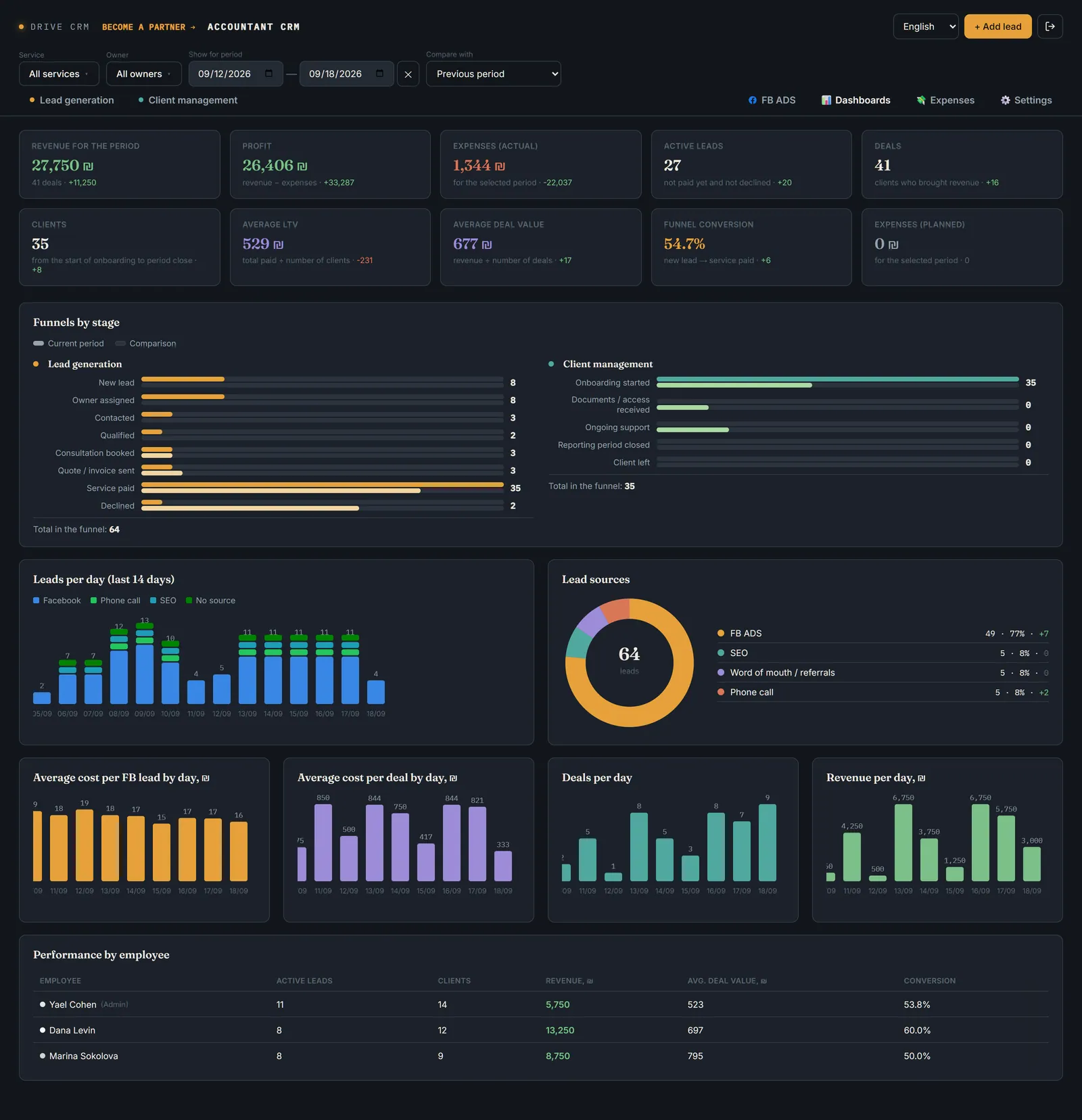
The manager's dashboard: what is happening in the practice
The answer to the morning questions: how many enquiries, clients and how much money. Ten metrics, each compared with the previous or any other period.
- Revenue, profit, expenses (actual and planned), enquiries, deals
- Clients, average LTV, average deal size, conversion
- Funnels by stage, enquiries by day and by source
- Staff performance; filters by service, employee and period
The clients on the screens are fictional. In a real project Drive CRM is built around your process: the stages, services, fields and roles will be yours.
We'll show it on your process
30 minutes with the Drive CRM team. You tell us how you handle enquiries and clients today, and we show you what that looks like in the CRM.
A CRM should show not only the client's state, but the next action
Employees don't need to remember everything. The system shows what is going on and what the next action should be.
Documents and deadlines — under control
A CRM shouldn't replace accounting work. It should help you control the process, the people and the deadlines around it.
The whole client history — in one card
A real excerpt from the demo CRM: a client card at the "Contacted" stage, with the qualification checklist and stars.
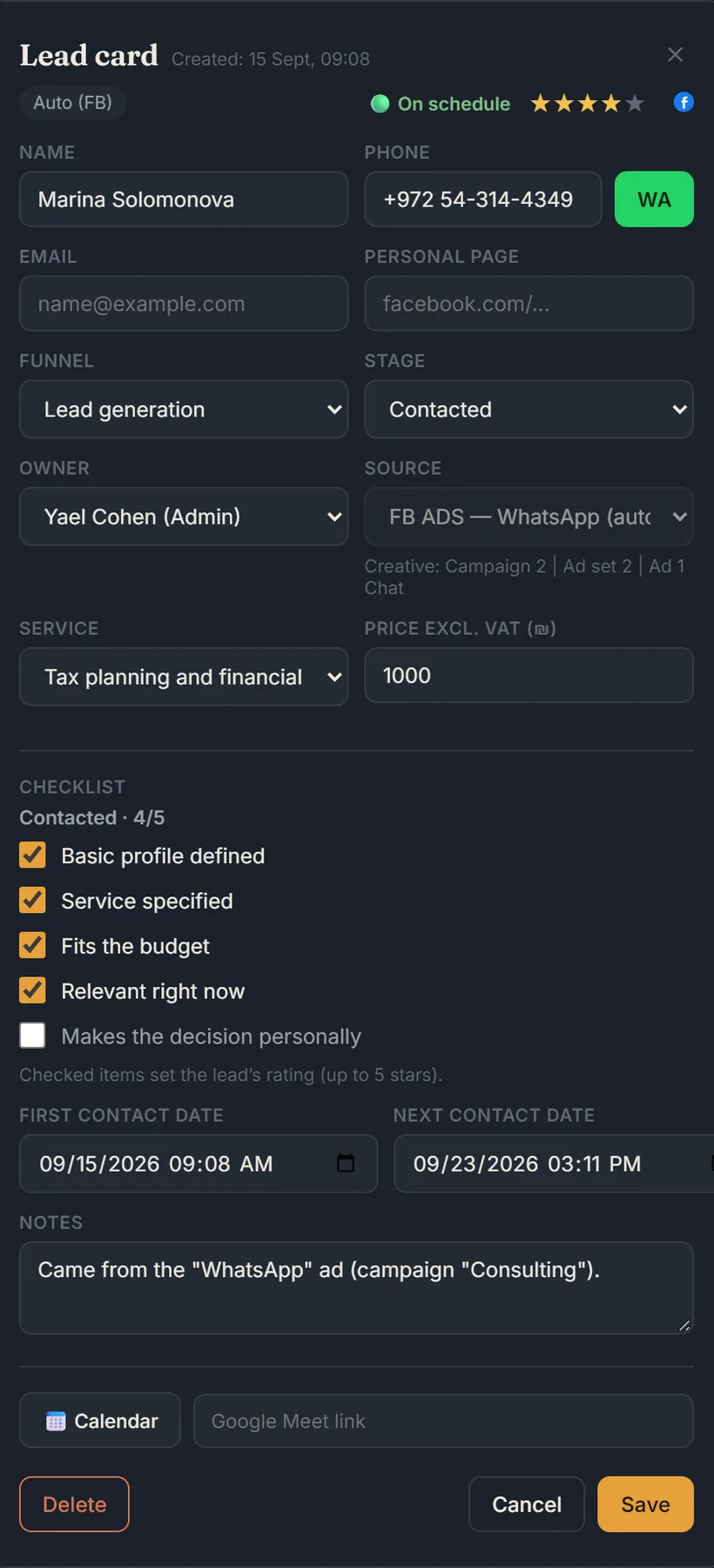
Scroll the card to see all of it
The phone number, a WhatsApp button next to it, the e-mail. If the client came from an advert, the ad group is pulled into the card automatically, with no manual entry.
Client profile, service needed, budget, how current the enquiry is, who makes the decision. The employee ticks the points during the conversation.
Every ticked checklist point is a star. Stars are visible on the new-clients board before the card is opened, so you can see how ready the lead is.
When you were in touch and when to write again — visible at once. What's worth remembering about this particular client is right there, not in a separate chat or notebook.
- Checklist points can be replaced with your own, to fit your practice
- The checklist can be turned on at any stage of the funnel, not only at "Contacted"
- Extra card fields for the process and services of your company
The client on screen is fictional. The set of card fields and the checklist logic are designed for your practice.
The manager sees each employee's performance, not just a list of clients
A real excerpt from the demo CRM dashboard: active leads, clients, revenue, average bill and conversion — for each employee.
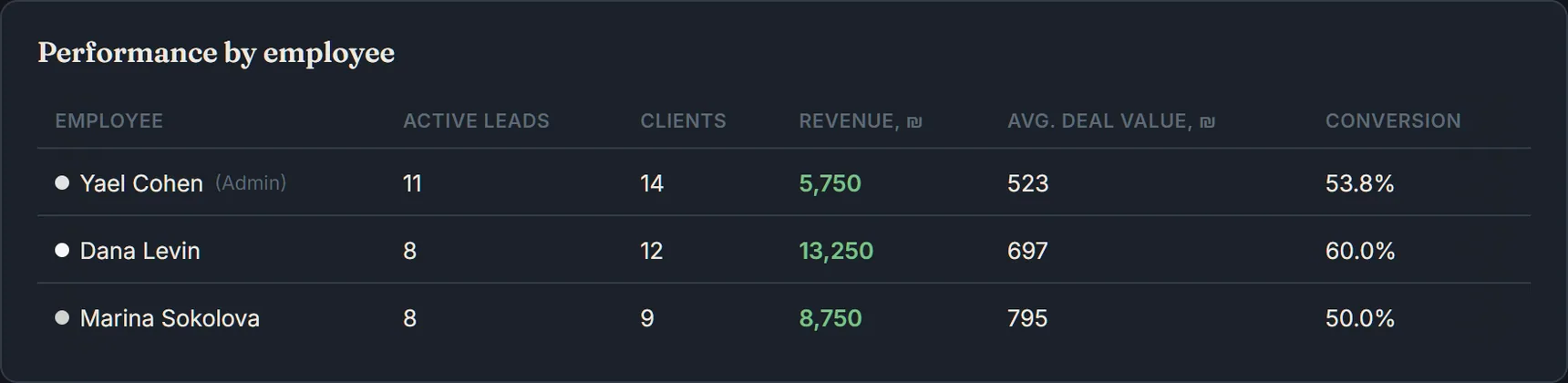
- The set of metrics is up to your practice (for example, overdue tasks or missing documents instead of conversion)
- A filter by employee and period is already on the dashboard
- Access rights: an employee sees only their own clients, the manager sees the whole team
The employees and figures come from the demo CRM, not from a specific client.
You already have the client. What else can you offer them?
Your client base already holds people who trust you. The CRM helps you not to forget repeat enquiries, renewals and additional services.
Reminders and workflows for additional services can be set up in the system.
Not a mock-up. See how DRIVE CRM works in a real business
This is not an accounting case. Sofia Vocal Studio is a vocal school, not an accounting firm. We show it so you can see how DRIVE CRM looks and works not on mock-ups, but on the live enquiries, deals and payments of a real business.
A vocal school, not an accounting firm. From the first enquiry to payment and a repeat sale — the client's whole journey is visible in one system.
- Nothing gets lost — every task and every lead in the funnel is under control
- One interface instead of scattered chats and spreadsheets
- End-to-end analytics shows where the advertising budget goes and which enquiries actually become deals
And how would this work in your practice?
Every accounting firm has its own processes. Next — specifically about what can be automated in working with clients and documents.
The routine around one client can run by itself
An example of a possible workflow — not a ready-made feature, but something that can be set up around your practice's process.
Fewer manual reminders to yourself. Fewer forgotten documents. More control.
All the important tools — in one system
You don't have to change the tools you're used to. DRIVE CRM's job is to connect the services you already use into one management system: WhatsApp, Email, Google Calendar, Google Sheets, your website, payments and advertising channels.
Less switching between systems. Less manual data transfer. More control over the business.
DRIVE CRM connects the tools of your business into one management system.
Why an off-the-shelf CRM is sometimes not enough
Lead → deal
Lead → qualification → client → service
Generic fields
Fields for your practice
A standard funnel
Your processes
General tasks
Tasks by client and service
Generic logic
Your company's logic
Not every accounting firm needs a custom CRM. But if your real processes no longer fit a standard system, it makes sense to build a system around those processes.
What changes when everything is in one system
From idea to a working system — 3 steps
You know what you'll get before development even starts.
You don't have to build everything at once
You can start with the one process that takes the most time today or causes the most problems.
And then gradually add document control, employee tasks, payments and other processes.
The system grows with the business.
Who builds DRIVE CRM

Artem Borovikov is an entrepreneur, marketer and the founder of DRIVE CRM. Over 25 years in marketing and business, his own agency since 2009, more than 10 years in senior marketing roles, 110+ companies and projects.
I don't look at a CRM as a program for storing clients. First I work out how the business runs, where the losses occur and what can be changed in the process. Only then do I design the system.
Business processes first. CRM second.
TRIZ: we look not only for automation, but for better process logic
CRM design uses TRIZ (the theory of inventive problem solving) — an approach to solving complex business problems. The aim is not only to automate the existing process, but to find a way to change its logic itself: for example, how work is distributed between employees, how enquiries are qualified, or how control of documents and deadlines is organised.
The system is built around your business — so the price depends on the task
You can start with a single process — for example, managing new clients — and gradually add document control, staff tasks, payments and other processes.
The economic effect depends on your company's processes: the number of clients, staff, manual operations and the cost of lost enquiries. In a consultation we can work out where the system could potentially save time and money.
For a business that needs a basic management system:
- Up to 2 users (+₪180/month per seat, up to 5)
- 1 sales funnel
- Google Calendar, Facebook, WhatsApp
- Client cards, tasks, basic analytics
For a business with several processes and funnels:
- From 5 users
- Several sales funnels
- Accepting payments: Stripe, Bit
- Invoices, expense tracking, custom fields
- Extra integrations: Google Ads and others
For a business with a complex structure and non-standard processes:
- Unlimited users and processes
- Full customization for the business
- Priority support
- Optional: a link to your accounting software — discussed and estimated separately
The prices shown are for a typical configuration. The final cost depends on the number of processes, integrations and the amount of automation.
Frequently asked questions
We'll show what a CRM could look like for your accounting practice
Tell us how clients come to you today, how you handle documents and tasks, and where most manual work happens. In 30 minutes we'll show which processes can be brought into one system.
Or write the word CRM on WhatsApp and we'll get back to you shortly.