Don't bend your business to fit a CRM.
Build a CRM around your business.
DRIVE CRM is a custom business management system that brings sales, clients, tasks, advertising, payments and analytics together on a single dashboard.
You see what is happening in your business and run it from one system.
While you drown in routine, your business loses orders and money
Yossi is an entrepreneur. He works for his business, drowning in conversations with clients and manual work. And while he is busy with the routine, the business loses orders.
In a car you see a warning light straight away
What about in a business?
DRIVE CRM is the dashboard of your business
In a car you instantly see your speed, fuel level, warnings and route. Why do you have to run a business through WhatsApp, Excel and dozens of tabs?
You shouldn't have to piece the picture of your business together. It should be right in front of you.
What do you see when you open DRIVE CRM in the morning?
No need to hunt for information across WhatsApp, spreadsheets and different systems.
The whole picture of your business is in front of you.
Look inside Drive CRM
Seven screens of a demo CRM for an accounting practice: from dashboards and the lead funnel to expenses and settings. The clients are fictional. Under each screen we explain what it shows and what you can do on it.
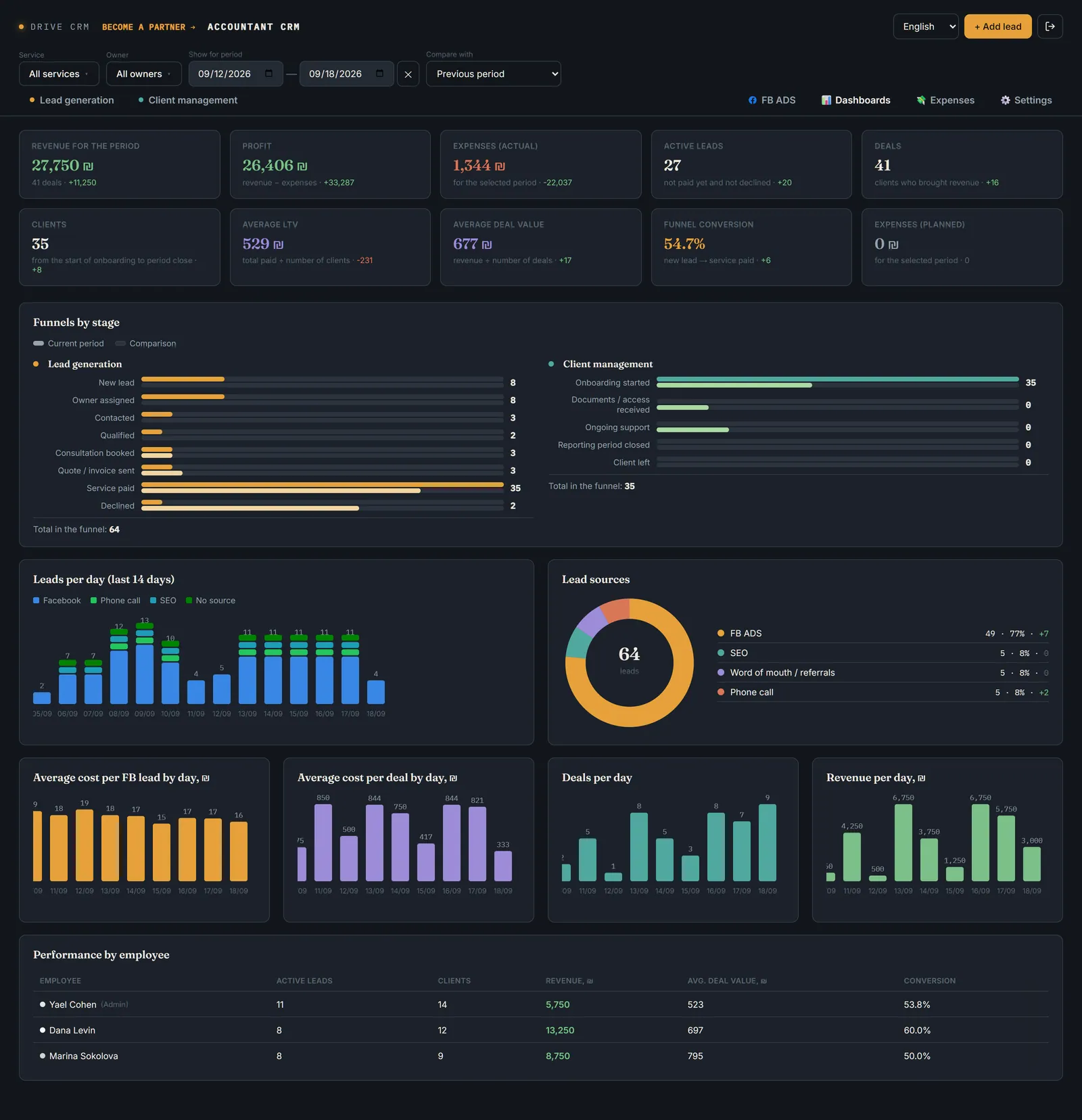
What is happening in the business, on one screen
The answer to the morning questions: how many enquiries, clients and how much money. Ten metrics, each compared with the previous or any other period.
- Revenue, profit, expenses (actual and planned), leads, deals
- Clients, average LTV, average deal size, conversion
- Funnels by stage, leads by day and by source
- Staff performance; filters by service, employee and period
The clients on the screens are fictional. In a real project Drive CRM is built around your process: the stages, services, fields and roles will be yours.
We'll show it on your process
30 minutes with the Drive CRM team. You tell us how you handle leads and clients today, and we show you what that looks like in the CRM.
You are losing money even if you can't see the problem
How much money could your business be losing every month?
Estimate in 1 minute how much potentially lost profit could come from missed enquiries, forgotten contacts and unfinished deals.
Now you can see how much money could potentially be lost. The next question: which part of it can be controlled with a system?
Not just a CRM. Look at a real business.
Sofia Vocal Studio: from advertising and enquiry to booking, payment and repeat sale — in one system.
From the first enquiry to payment and a repeat sale — the client's whole journey can be seen in one system.
Before
- Up to 20% of enquiries were lost
- Clients waited a long time for a reply
- There was confusion about the times of scheduled lessons and consultations
- It was hard to tell whom to contact, and when, for every lead in the funnel
After
- Nothing gets lost — every task and every lead in the funnel is under control
- One interface instead of scattered chats and spreadsheets
- End-to-end analytics and dashboards show where to direct the advertising budget to get more real deals, not just leads
| Name | Spent | Leads | Cost per lead | Deals | Cost per deal |
|---|---|---|---|---|---|
| Ad group 1 — “Course” | ₪340 | 30 | ₪11 | 4 | ₪85 |
| Ad group 2 — “Diagnostic” | ₪254 | 9 | ₪25 | 4 | ₪63 |
A cheap lead ≠ a cheap deal
More expensive leads don't mean more expensive deals: a lead in the “Diagnostic” group costs ₪25 versus ₪11 in the “Course” group — but a deal there comes out almost 26% cheaper: ₪63 instead of ₪85.
By switching off the campaign with cheaper leads but expensive deals and redirecting the budget to “Diagnostic” — at 200 leads a month (89 deals) — the saving on acquisition cost was ₪1,960 per month.
That fully paid back the CRM implementation in the very first month.
DRIVE CRM shows not only the cost of a lead, but the cost of a real deal.
And how would this work in your business?
Every business has its own processes. That's why we don't ask you to adapt to a ready-made CRM — we build the system around your way of working.
Routine turns into autopilot
Fewer manual actions. Fewer forgotten tasks. More control.
All the important tools of your business — in one system
DRIVE CRM brings together the CRM, advertising, communication, calendar, documents and payments, so the key information is available from a single dashboard.
Less switching between systems. Less manual data transfer. More control over the business.
DRIVE CRM connects the tools of your business into one management system.
You don't adapt to the CRM
The CRM adapts to you
First we work out how your business runs, and only then do we build the system.
When an off-the-shelf CRM is no longer enough
An off-the-shelf CRM is a good tool. But sometimes a business becomes too non-standard for a ready-made tool.
The question is not which CRM is better. The question is which system fits your business.
You work by the rules of a ready-made system
The system works by the rules of your business
You choose from ready-made features.
We build the logic you need.
The business adapts to the system.
The system adapts to the business.
Standard processes.
Your real processes.
A universal interface.
Only the business functions you need.
Platform limitations.
The system can grow together with the business.
Not every business needs a custom CRM. But if a standard system is no longer enough, it makes sense to build one around your own processes.
The difference starts before development
What this gives you as an owner
When an off-the-shelf CRM is really enough
- a standard sales process;
- an ordinary funnel;
- the integrations you need already exist;
- no complex automation is required;
- the business fits easily into the standard CRM logic.
When to consider Drive CRM
- a non-standard sales or service process;
- several systems you constantly have to switch between;
- Excel, WhatsApp, Google Sheets and other services have effectively become part of the CRM;
- a lot of manual work;
- staff constantly move data from one system to another;
- standard automation is no longer enough;
- it is hard for the owner to see the whole picture of the business;
- the CRM has to reflect your exact way of working.
Sometimes you just need to build a CRM for your business
Drive CRM is built around your processes, not the other way round.
Not sure which option suits your business?
We'll go through your processes and, in 30 minutes, work out whether you need a custom CRM or a ready-made solution will do.
For businesses with too much to keep in your head
What changes when everything is in one system
From idea to a working system — 3 steps
You know what you'll get before development even begins.
You don't have to build everything at once
You can start with the one process that takes the most time today or causes the most problems.
Then gradually add advertising, payments, analytics and automation.
The system grows together with the business.
Why I'm building DRIVE CRM

I have worked in marketing and business for more than 25 years. Since 2009 I have owned my own agency, and I've gone from setting up ads to running marketing and business processes.
That's why I don't see a CRM as a program you upload a spreadsheet into. First I work out where the business loses money, time and control. Only then do I design the system.
Business processes first. CRM second.
I have worked in marketing and business for more than 25 years.
Since 2009 I have owned my own marketing agency.
Over my career I spent more than 10 years as a marketing director in large companies, managing teams and being responsible for business development and marketing strategy.
I went from setting up advertising and marketing myself to managing specialists, teams, contractors and business processes.
I didn't just study marketing — I tried most marketing tools myself, on my own business.
Advertising, promotion, sales, analytics, different channels for attracting clients — I went down this road myself.
I can work out a marketing tool on my own, set it up, check how effective it is, and see where a business really gets results and where it is just spending budget.
This practical experience is what lets me work with specialists properly.
An owner doesn't have to do everything personally.
But they must understand enough to set a specialist the right task, judge the result and spot ineffective work in time.
To manage a paid-ads specialist effectively you need to understand targeting. To manage a marketer, you need to understand marketing.
That is why I can choose the right specialists and build a team around results, not around a set of separate services.
I don't only work with other people's businesses — I'm an entrepreneur myself.
I own a recording studio in Israel and in St. Petersburg.
From my own experience I know what happens to a business when clients and processes multiply.
Enquiries arrive from different channels. Employees, tasks, payments, communication and dozens of control points appear.
Information ends up in WhatsApp, Excel, Google Sheets and other services.
And the owner gradually turns into a dispatcher of their own business.
That is why I understand the problem Drive CRM solves so well.
I use TRIZ — the theory of inventive problem solving — not just to find ideas but to solve complex business problems.
Instead of simply making one more product among competitors, we look for a solution that changes the very logic of the business.
That is why DRIVE CRM is not a set of standard features. The system is designed around the specific logic of a business.
I graduated from Saint Petersburg State University (SPbU), the Graduate School of Management.
I completed a bachelor's programme and continued with a master's.
The SPbU Graduate School of Management developed in an international format and worked with leading foreign business schools, including the University of California, Berkeley.
Today I'm developing Drive CRM in Israel to help new immigrants and entrepreneurs who have long worked in Israel to run their business more systematically and more effectively than their competitors.
I went from marketing and advertising to managing businesses, teams and processes myself.
So my approach is simple: first understand how the business works → find the points of loss → design the processes → automate them.
Excel, WhatsApp, Google Sheets and dozens of separate services can help a business at the start. But as processes multiply, they stop being a management system.
And then a business doesn't just need a CRM. It needs a management system.
It should show the owner what is happening with clients, sales, tasks and money — and help make decisions before a problem turns into lost money.
“I don't want to make you one more program.
I want you to finally see what is going on inside your business.”
The system is built around your business — so the price depends on the task
You can start with a ready-made configuration or order a system built around your specific business processes straight away.
In most cases the implementation pays for itself in the very first month — through recovered leads and a more accurate allocation of the advertising budget.
For a business that needs a basic management system:
- Up to 2 users (+₪180/month per seat, up to 5)
- 1 sales funnel
- Google Calendar, Facebook, WhatsApp
- Client cards, tasks, basic analytics
For a business with several processes and funnels:
- From 5 users
- Several sales funnels
- Accepting payments: Stripe, Bit
- Invoices, expense tracking, custom fields
- Extra integrations: Google Ads and others
For a business with a complex structure and non-standard processes:
- Unlimited users and processes
- Full customization for the business
- Priority support
- Optional: integration with accounting / tax reporting
The prices shown are for a typical configuration. The final cost depends on the number of processes, integrations and the amount of automation.
Frequently asked questions
It's time to stop running your business blind
We'll show you what a dashboard for your business could look like.
Or write the word CRM on WhatsApp and we'll get back to you shortly.